
CVS Photo Promo Code Workflow: How to Save More Without Wasting Checkout Time
Most people search for a cvs photo promo code five minutes before checkout, paste three codes, watch two fail, and accept whatever discount sticks.
That is how money gets left on the table. Not because shoppers are lazy, but because photo orders are messy: prints, canvas, cards, books, same-day pickup, shipping, loyalty offers, category sales, and single-use promo codes all collide in one cart.
Teams think the problem is finding a code. The real problem is building a checkout workflow that shows which discount actually lowers the final payable total.
That changes the conversation. A useful CVS Photo savings process is less about chasing a magic code and more about controlling variables: product type, fulfillment method, sale price, coupon eligibility, taxes, shipping, and timing. The practical question is not, “Do I have a CVS Photo coupon?” It is, “Can I prove this order is cheaper before I pay?”
Table of contents
- Why a cvs photo promo code is a workflow problem
- Build a simple CVS Photo savings stack
- Where to find a cvs photo promo code that is worth testing
- How to test codes without wasting checkout time
- Coupon stacking rules for CVS Photo orders
- Common failure modes with CVS Photo discounts
- A repeatable checkout workflow for photo orders
- Budgeting photo projects without chasing every code
- How coupon communities make CVS Photo deals better
- When a cvs photo promo code is not the best deal
- How c0upons.com fits into the savings workflow
Why a cvs photo promo code is a workflow problem
A CVS Photo order is not a normal retail cart. You are buying a customized item with production rules, deadlines, store availability, and fulfillment choices. That makes coupon testing more like a small decision system than a simple paste-and-save moment.
The checkout total is the source of truth
The mistake teams make is treating the visible coupon discount as the win. A code that says 50% off can still lose to another checkout path if shipping, pickup availability, product exclusions, or a category sale changes the final number.
Your source of truth is the final payable total after the promo code is applied, before you authorize payment. Not the banner. Not the product page. Not the email subject line. The final total.
Practical rule: Never judge a CVS Photo promo by the advertised percentage. Judge it by the final cart total after taxes, shipping, and fulfillment are selected.
This matters because photo products often have different promotional calendars. A poster, a canvas, a photo book, and 4x6 prints may not share the same discount logic.
Why CVS Photo deals change so often
Photo deals move because demand is seasonal. Graduation, holidays, back-to-school, weddings, Mother’s Day, Father’s Day, and last-minute gifting all create spikes. Retailers adjust promotions around those moments.
That means a CVS Photo promo code that worked for someone last week may be dead today, category-limited, or worse than a live sale. In production, deal hunting breaks when shoppers do not capture the context around a working code.
The practical question is: what product did it work on, when, and under what checkout conditions?
What deal hunters should track
Track four fields every time you test a code:
- Product category: prints, cards, books, canvas, gifts, posters
- Fulfillment: ship to home, same-day pickup, store pickup window
- Discount behavior: percentage off, dollar off, free shipping, bundle pricing
- Final total: before code, after code, after shipping and tax
You do not need a spreadsheet for every order. But you do need the habit. Without it, you are guessing.
Build a simple CVS Photo savings stack
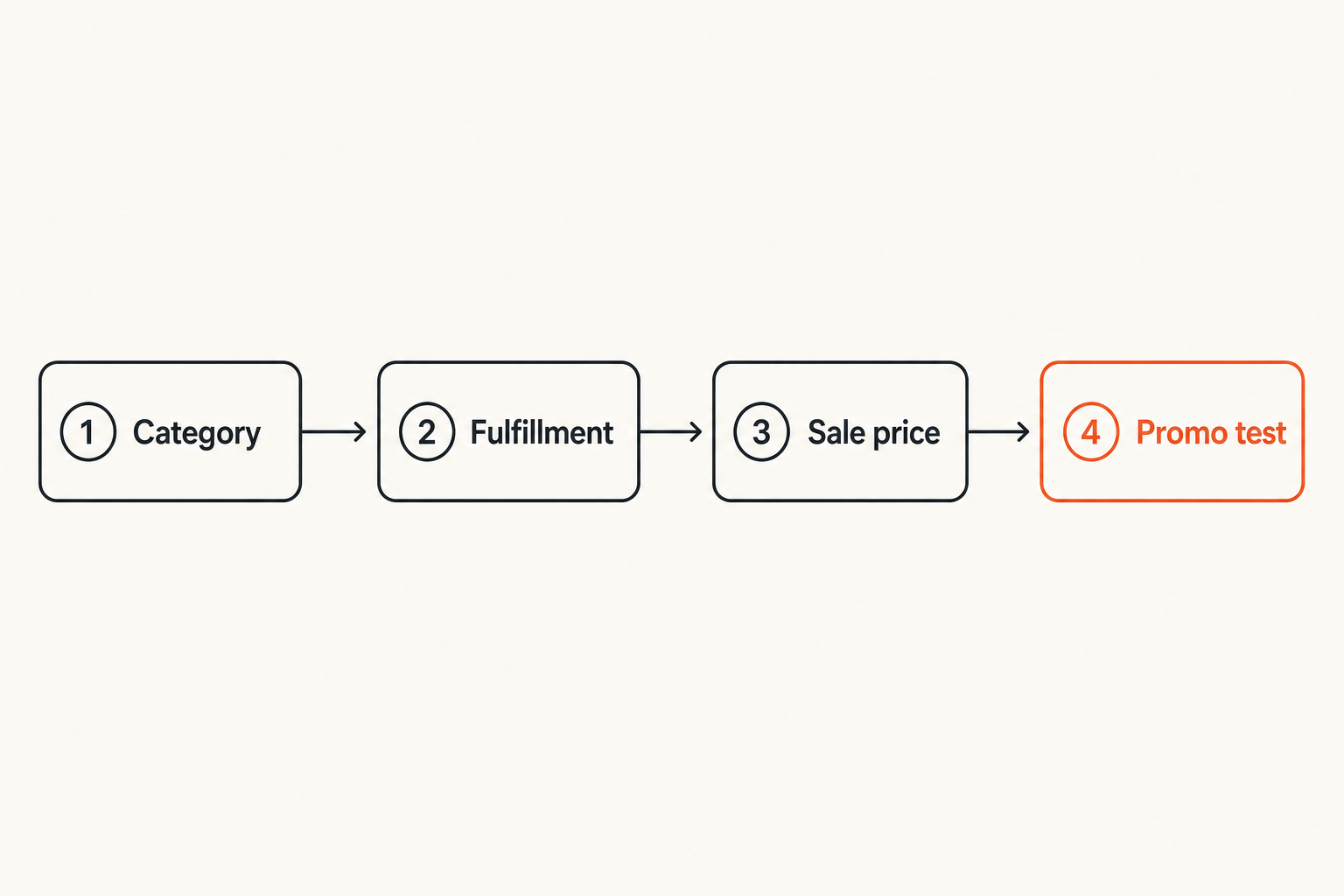
A savings stack is the order in which you combine discounts. The goal is not to use the most coupons. The goal is to avoid invalid combinations and find the lowest total quickly.
Start with the product category
Start with the thing you actually need. If you need same-day 4x6 prints, do not build a cart around a photo book deal. If you need a canvas by Friday, do not chase a shipped-only coupon that misses your deadline.
A useful way to think about it is this:
- Need and deadline first
- Product category second
- Fulfillment method third
- Promo code last
The code comes late because it can only optimize a cart that already matches the real purchase.
Layer promo codes after sale pricing
Many photo products already show sale pricing before you enter a code. That can be good or bad. Sometimes the sale is the best available discount. Sometimes a promo code improves it. Sometimes the system blocks stacking.
What breaks in practice is assuming a code stacks because it appears accepted. Some carts accept a code but apply it only to eligible items, leaving the rest unchanged.
Practical rule: Build the cart without a code first, record the total, then apply one CVS Photo promo code at a time. If you do not know the baseline, you cannot measure the savings.
Separate shipped orders from store pickup
Pickup and shipping are different economic paths. Same-day pickup may save shipping and solve urgency. Shipping may open different promotions or product options.
For photo orders, this can change the decision entirely. A shipped discount that looks strong may lose once delivery fees appear. A pickup order with a smaller coupon may win because the fulfillment cost is lower.
Related reading from our network: Django streaming architecture has a similar lesson about workflows beating single-step fixes, even though the domain is different. The useful parallel is that the visible front-end action is not the whole system; the backend flow decides whether the experience works.
Where to find a cvs photo promo code that is worth testing
Finding a cvs photo promo code is easy. Finding one worth testing is the work. Most shoppers lose time because they treat every code result as equal.
Use community code search before checkout
Start with live community signals. A coupon site can reduce the search space if users report what worked recently and under what conditions. Before you spend time customizing a photo book or card set, check a searchable coupon database like community-submitted promo code search so you are not starting from stale browser results.
That does not mean every listed code will work for your cart. It means you get a candidate list before you enter checkout.
Check CVS Photo pages and email offers
Retailer-owned offers matter. CVS may show photo deals on product pages, in cart banners, through email, or through app and account-based offers. These can be category-specific or account-specific.
The mistake teams make is copying a third-party code while ignoring the offer already attached to the product. If a product page says a canvas is already deeply discounted, your first test should be whether an extra code improves that sale or conflicts with it.
Validate dates and exclusions
Expiration dates are useful, but they are not enough. Look for exclusions:
- New customers only
- Online only
- App only
- Ship-only or pickup-only
- Specific size or product line
- One use per account
- Not valid with other offers
A code with clear restrictions is often more useful than a vague code with a large advertised discount. Restrictions tell you whether the test is worth running.
How to test codes without wasting checkout time
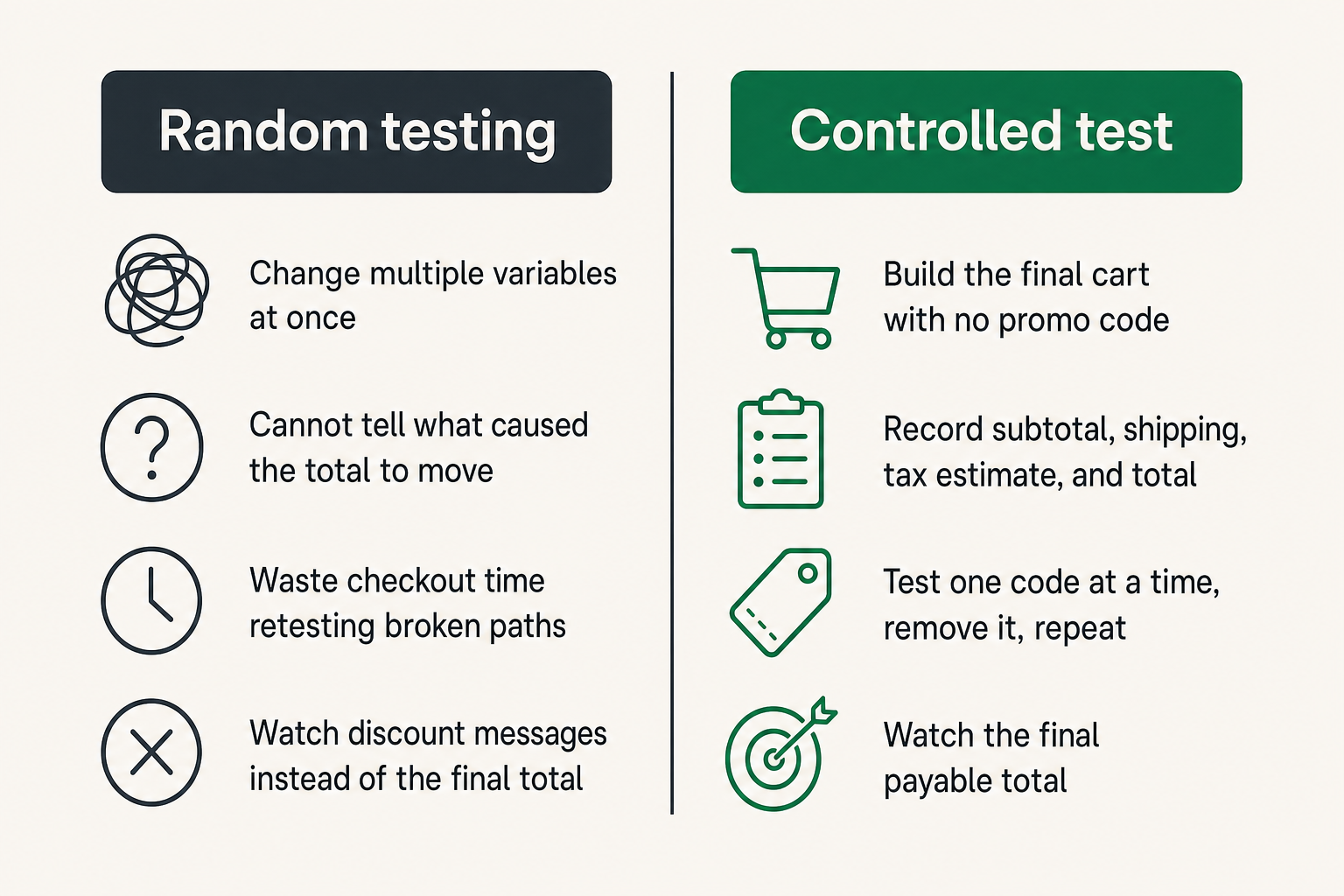
Coupon testing should be controlled. If you change the product, quantity, pickup location, and promo code at the same time, you cannot tell what caused the total to move.
Create a baseline cart
Build the cart exactly as you intend to buy it. Use the right sizes, quantities, paper types, covers, frames, finishes, and fulfillment option. Then write down or screenshot the total before entering any code.
For photo products, tiny upgrades can create large differences. A glossy finish, premium cover, larger size, or faster delivery window may move the cart out of the cheapest path.
Test one variable at a time
Use this testing sequence:
- Build the final cart with no promo code.
- Record subtotal, shipping, tax estimate, and total.
- Apply the first CVS Photo promo code.
- Record whether the code was accepted, rejected, or partially applied.
- Remove it before testing the next code.
- Repeat for each candidate.
- Compare final totals, not discount messages.
This sounds slower than pasting codes randomly. It is usually faster because you stop retesting the same broken path.
Watch the final payable total
Some discounts change shipping. Some reduce only one item. Some trigger minimum spend rules. Some appear to work until you change pickup location.
What works is keeping your eye on the total that will actually be charged. What fails is celebrating a green success message without checking the payable amount.
Related reading from our network: crawler visibility on Google Compute Engine also depends on validation and logging. Different niche, same operating principle: if you do not verify the output, the setup does not matter.
Coupon stacking rules for CVS Photo orders
CVS Photo stacking is not guaranteed. Treat every stack as a hypothesis until checkout proves it.
What usually works
What often works in photo checkout environments:
- A product-level sale plus a code that is allowed on sale items
- A free shipping threshold plus an eligible cart total
- A category promo on matching products only
- Pickup savings compared with shipped delivery
- Account offers that apply automatically before manual code testing
Do not assume all of these will combine. The point is to test likely combinations in a clean order.
What usually fails
What often fails:
- Two manual promo codes in the same cart
- A sitewide retail coupon on custom photo products
- A code for prints applied to photo books
- A shipped-only promo on store pickup
- A minimum-spend offer calculated after discounts instead of before discounts
What breaks in practice is misunderstanding the minimum spend. If a code requires $40 and your sale-adjusted subtotal is $38, the code may fail even if the original product price was higher.
A practical stacking table
| Approach | Why shoppers try it | What to verify | Risk level |
|---|---|---|---|
| Sale price only | Fast and visible | Final total with fulfillment | Low |
| Sale plus one promo code | Best common path | Whether code applies to sale items | Medium |
| Multiple manual codes | Looks like extra savings | Whether checkout allows more than one | High |
| Free shipping threshold | Can beat a larger discount | Cart total after discounts | Medium |
| Store pickup | Avoids shipping and speeds delivery | Local availability and deadline | Low to medium |
Practical rule: The best CVS Photo discount is the one that survives the entire checkout path, not the one with the biggest headline.
Common failure modes with CVS Photo discounts
Bad coupon workflows fail in predictable ways. Once you know the failure modes, you can avoid most wasted checkout loops.
The code applies but saves less than expected
This is the most annoying outcome because it feels like success. The code is accepted, but the savings are smaller than expected.
Common causes include:
- Only one item in the cart is eligible
- The discount excludes premium options
- The percentage applies to subtotal before or after another offer differently than expected
- Shipping and tax reduce the practical value
- The code has a maximum discount cap
The fix is not to argue with the message. Compare totals.
The product is excluded
Photo categories are not interchangeable. Prints are not canvas. Cards are not gifts. Photo books may have separate rules based on size or cover type.
If the code fails, do not immediately assume it is dead. First check whether your product belongs to the promoted category. Then check whether options pushed it outside eligibility.
A common example: a promo works on standard photo books but not premium layflat books. The upgrade may be worth it, but it changes the coupon math.
The pickup and shipping totals diverge
Fulfillment is where many shoppers misread savings. A shipped order may accept one code while pickup accepts another. Inventory and production timing can also vary by store.
If your deadline is flexible, compare both. If your deadline is fixed, stop pretending a cheaper shipped offer matters when it will arrive late.
Related reading from our network: decentralized compute builders face the same retry and ownership issues when workflows branch. The shopping version is simpler, but the lesson holds: once paths diverge, compare complete outcomes, not isolated steps.
A repeatable checkout workflow for photo orders
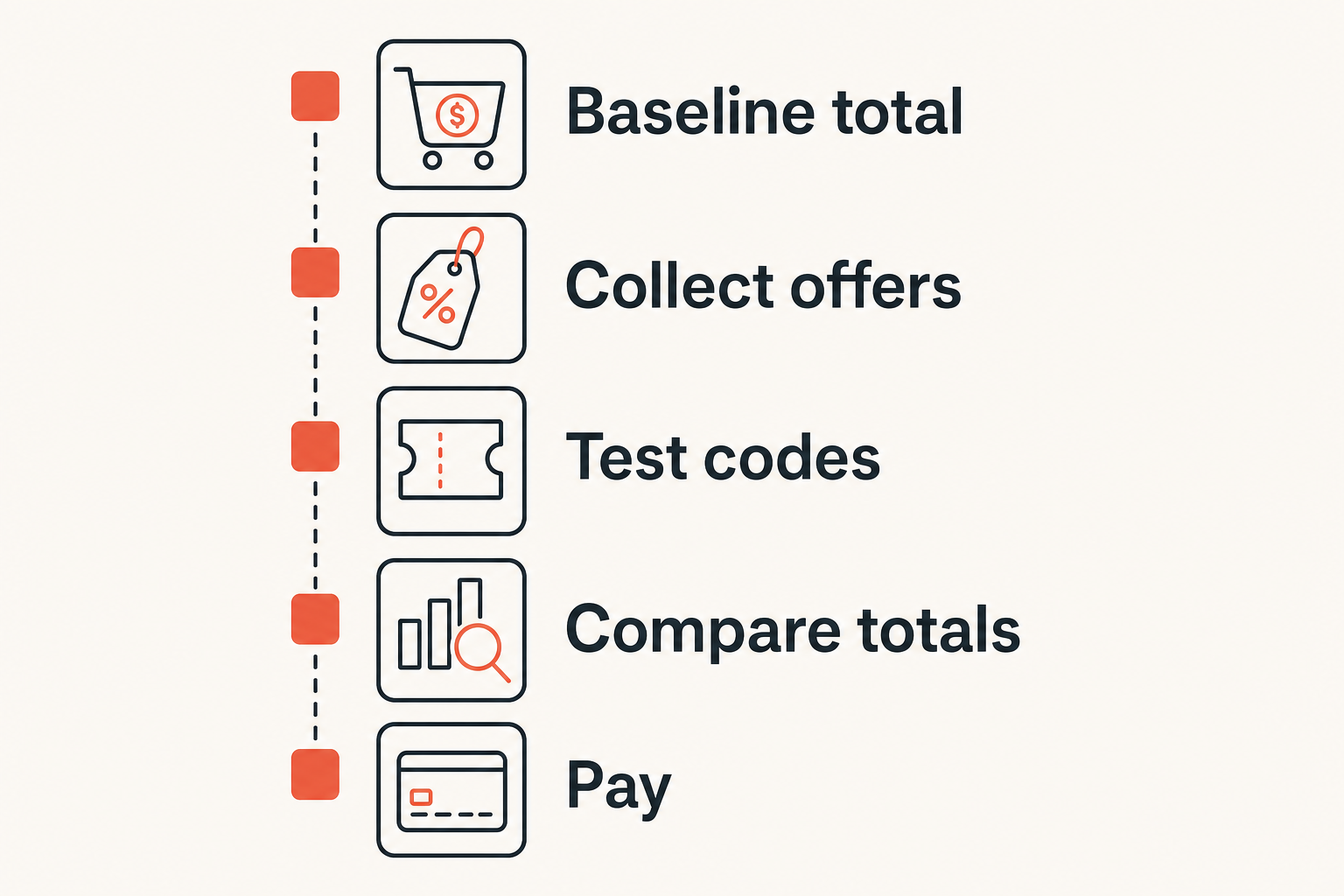
This is the workflow I would use for any meaningful CVS Photo order: holiday cards, a canvas gift, a batch of prints, or a photo book.
Step 1 define the order
Write down what you need before browsing:
- Product type
- Quantity
- Required arrival or pickup date
- Maximum acceptable price
- Must-have upgrades
- Nice-to-have upgrades
This prevents the cart from drifting. Cart drift is when a shopper starts with basic prints and ends with premium finishes, extra sizes, and shipping fees, then blames the coupon for not saving enough.
Step 2 collect offers
Collect three to five candidate offers:
- CVS Photo page sale
- Email or app offer
- Community-reported promo code
- Free shipping or pickup option
- Seasonal category deal
Do not collect twenty codes. That creates noise. Most codes will be expired, excluded, duplicated, or worse than the visible sale.
Step 3 test and document
Test each candidate against the same cart. For a bigger order, use a simple note like this:
| Test | Code or offer | Accepted | Final total | Notes |
|---|---|---|---|---|
| Baseline | No code | Yes | $X | Pickup selected |
| A | Category sale | Yes | $X | Auto-applied |
| B | Manual code | No | $X | Excluded product |
| C | Free shipping | Yes | $X | Ship only |
You do not need exact numbers in a public coupon comment if you do not want to share them. But for your own purchase, the numbers decide.
Step 4 decide and pay
Choose the lowest total that still satisfies the real constraint: deadline, quality, and convenience.
The cheapest option is not always the best option. If pickup saves $3 but requires a 40-minute drive, that may not be a real win. If shipping costs more but avoids a missed gift deadline, that may be the better decision.
Budgeting photo projects without chasing every code
Deal hunting has a cost: time. The better workflow is to set boundaries before you start.
Set a target price before browsing
For a photo book, canvas, or large print order, decide the target total before customization. This gives you a stopping rule.
Example:
- “I will buy this canvas if the final total is under $35.”
- “I will order holiday cards today if the shipped total is under $60.”
- “I will wait if prints are not discounted this week.”
That changes the conversation from endless searching to a decision threshold.
Compare delay versus savings
Photo promos are seasonal, so waiting can help. But waiting can also create rush shipping, fewer pickup windows, or lower product availability.
Ask two questions:
- Is this order deadline-sensitive?
- Is the likely savings from waiting bigger than the risk or hassle?
If the answer is no, use the best current checkout path and move on.
Avoid upgrading away your discount
Retailers make upgrades easy because upgrades increase order value. There is nothing wrong with choosing better paper, larger sizes, or premium covers. The issue is doing it accidentally while evaluating a code.
What fails is testing a code on a basic item, then upgrading the item and assuming the same economics still apply. Recheck the total after every meaningful upgrade.
How coupon communities make CVS Photo deals better
Coupon communities work when people share signal, not just strings of characters. A raw code without context helps less than a short note explaining where it worked.
Share the conditions not just the code
A useful report looks like this:
- Worked today on 8x10 prints for store pickup
- Did not work on canvas
- Applied after sale price
- Minimum spend appeared to be based on discounted subtotal
- Account was logged in
That kind of note saves other shoppers time. It also reduces the noise of dead-code testing.
Report failures cleanly
If a code fails, report the failure with context. “Did not work” is better than nothing, but “did not work on shipped photo book, premium cover, logged-in account” is much more useful.
Coupon communities degrade when shoppers treat every failure as proof that a code is fake. Sometimes the code is real and the cart is wrong. Sometimes the code is expired. Sometimes it is account-targeted. The difference matters.
Use adjacent store workflows
Photo and pharmacy retail promotions share a lot of checkout behavior: account offers, category restrictions, loyalty pricing, pickup logic, and weekly promotion cycles. If you want a broader retail coupon process, the same testing discipline applies in our Walgreens coupon code workflow, especially around stacking and comparing final totals.
The store changes. The workflow mostly does not.
When a cvs photo promo code is not the best deal
A cvs photo promo code can be useful, but it is not always the winning path. Sometimes the best deal is already in the cart.
Store sales can beat codes
A strong category sale can beat a weak manual code. If CVS Photo is running a clear sale on the exact product you need, the sale may be the cleanest path.
This is especially true when the promo code excludes sale items or applies only to a narrow product group. The mistake teams make is trying to force a code into a cart where the sale is already doing the work.
Loyalty and pickup can change the math
Account-based offers, loyalty benefits, and pickup options can change the final total without a public code. These are easy to miss because shoppers often search the web before checking the logged-in cart.
If you have a CVS account, test while logged in and while the correct store is selected. Local pickup availability can affect both timing and price.
Support costs matter
Customized photo orders can be hard to unwind. If you choose the wrong size, miss the pickup window, or order too late, the coupon savings may not matter.
The practical question is not just “How much can I save?” It is also “Will this order arrive correctly, on time, and without extra support friction?”
How c0upons.com fits into the savings workflow
Coupon tools are useful when they shorten the path from search to decision. They are less useful when they dump every possible code into the checkout process with no context.
Search before you build the cart
For CVS Photo, search early enough to understand the deal landscape before you spend time customizing. If codes are focused on cards this week and you need canvas, you know not to waste time. If pickup deals are active and your deadline is tight, that may shape the cart from the start.
The workflow is simple: search, shortlist, build cart, test, compare, pay.
Keep the community signal useful
Good coupon communities are maintained by shoppers who report outcomes. If a CVS Photo promo code works, share the product category and fulfillment method. If it fails, share the same context.
That is how a coupon database becomes more than a pile of expired codes. It becomes a practical decision layer for people who do not want to waste checkout time.
Closing checklist for 2026
Before you place a CVS Photo order in 2026, run this checklist:
- Did you define the product and deadline first?
- Did you record the no-code baseline total?
- Did you test one cvs photo promo code at a time?
- Did you compare pickup against shipping?
- Did you check whether the sale price already beats the code?
- Did you choose based on final payable total?
If yes, you are shopping with a workflow instead of hoping a random code saves the day.
Try c0upons.com
c0upons.com helps online shoppers find practical ways to save money with coupon codes, promo codes, sales, and deal roundups. Before your next CVS Photo order, Try c0upons.com and test your cvs photo promo code against the real checkout total.