
Amazon Promo Code Workflow: How to Find, Test, and Use Real Discounts in 2026
An Amazon promo code looks simple until you are five minutes into checkout, three tabs deep, and the discount still does not apply.
You found a code on a forum. Another site says it is verified. Amazon shows a clipped coupon on the product page. The seller has a Lightning Deal running. Then checkout changes the total, shipping moves, tax updates, and the code box either disappears or rejects the offer.
Teams think the problem is finding one magic Amazon promo code. The real problem is building a repeatable shopping workflow that separates real savings from dead codes, account-specific offers, seller restrictions, and bad deal math.
That changes the conversation. The practical question is not whether Amazon promo codes exist. They do. The practical question is how to search, test, compare, and decide quickly enough that the savings are worth the time.
Table of contents
- Why an Amazon promo code is a workflow, not a lucky paste
- Build your Amazon promo code search stack
- Understand where Amazon discounts actually apply
- Test an Amazon promo code without wasting checkout time
- What works: stacking, timing, and cart strategy
- What fails: dead codes, fake urgency, and bad deal math
- A practical workflow for big Amazon sale events
- Compare code-hunting approaches
- Operational checklist for budget-conscious households
- Make Amazon promo code savings repeatable with c0upons.com
Why an Amazon promo code is a workflow, not a lucky paste
The wrong mental model
The mistake teams make is treating Amazon promo code hunting like a lottery ticket. Search the web, copy the first code, paste it at checkout, hope it works. That model is fine for a one-off purchase where you do not care about time, but it breaks quickly if you shop Amazon often or manage a household budget.
Amazon is not one store in the old sense. It is a marketplace, a fulfillment network, a subscription system, a payment environment, and a promotional platform. A discount may be funded by Amazon, a third-party seller, a brand, a payment issuer, or a subscribe-and-save program. Those differences matter because each one has different rules.
A useful way to think about it is this: you are not looking for a code. You are validating a transaction.
That transaction has inputs:
- Product price
- Seller
- Fulfillment method
- Shipping speed
- Account eligibility
- Prime status
- Digital coupon availability
- Promo code eligibility
- Payment method
- Return risk
Change one input and the discount may change. That is why a code can work for one shopper and fail for another without anyone lying.
Related reading from our network: technical teams face a similar trust-and-workflow problem when distribution depends on platform rules, signing, and eligibility, as explained in this Apple Developer Program workflow guide.
The checkout total is the source of truth
Do not trust the banner. Do not trust the badge. Do not trust the percentage until the final checkout total updates.
Amazon product pages can show multiple savings signals at once: limited-time deal, list price discount, clipped coupon, promotional message, bundle discount, Prime shipping, or a payment offer. Some are real reductions. Some are just comparisons against a list price you would never pay. Some apply only after you clip a coupon or select a specific seller.
Practical rule: The only discount that counts is the one reflected in the final order total before you place the order.
This is the workflow anchor. If you build your process around final totals instead of visible badges, you avoid most bad savings decisions.
When timing matters more than the code
Many Amazon discounts are time-sensitive. Lightning Deals expire. Coupons disappear. Seller inventory shifts. A promo code may be valid but useless if the item price increased overnight.
That changes the conversation again. The best Amazon promo code is not always the largest percentage. It is the code that produces the best final price at the moment you are ready to buy.
For common purchases, speed matters. If you spend 25 minutes chasing a code to save 60 cents, the workflow failed. If you spend 10 minutes before a large household order and save meaningfully across multiple items, the workflow worked.
Build your Amazon promo code search stack
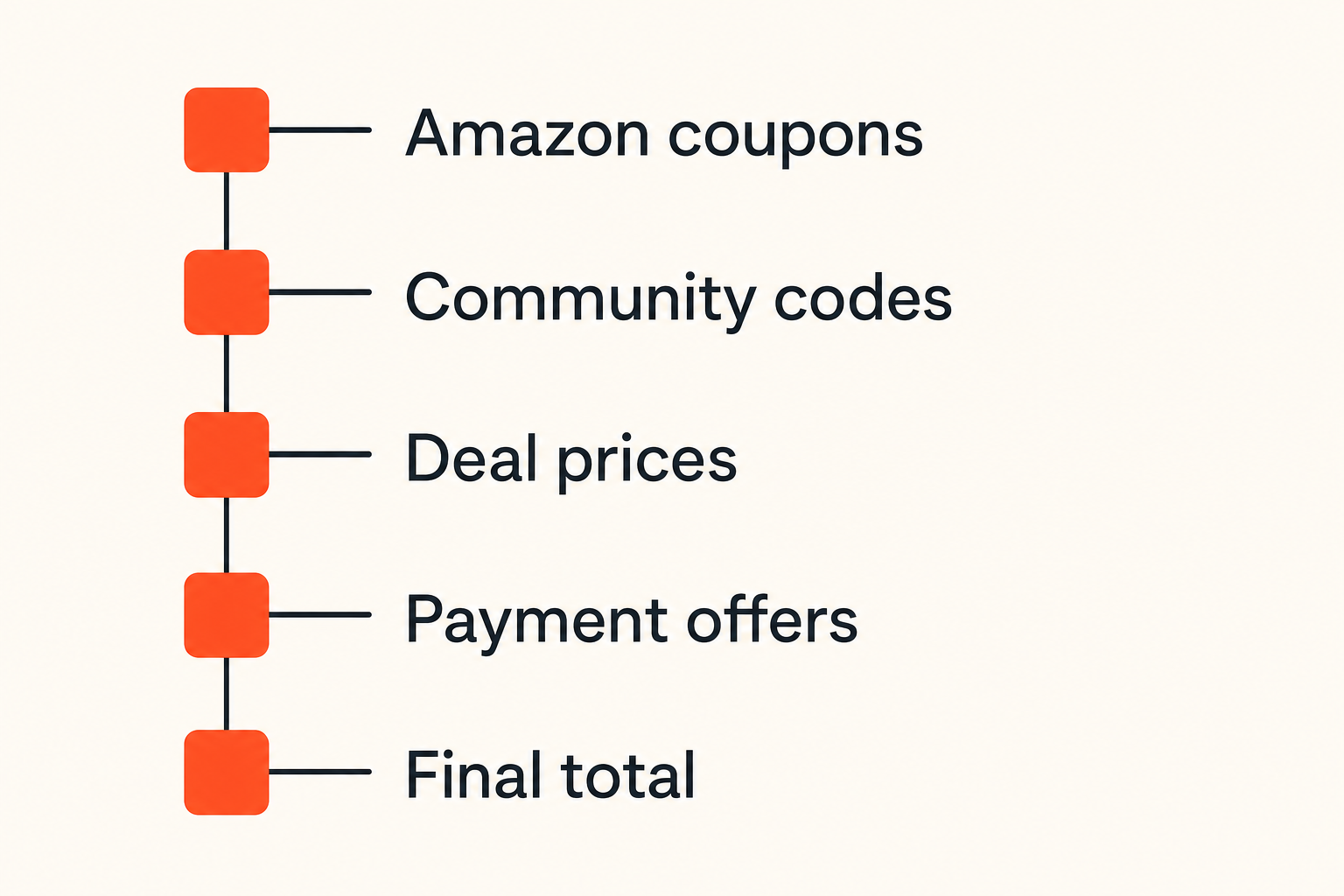
Start with Amazon-native discounts
Start inside Amazon before you search outside. Amazon-native discounts are easier to validate because they usually appear on the product page or in checkout.
Look for:
- A checkbox coupon under the price
- A promotional message near the price, often saying save at checkout
- Subscribe & Save discounts
- Quantity or bundle discounts
- Prime-exclusive pricing
- Limited-time deals
- Credit card or gift card reload offers
The mistake teams make is opening a dozen coupon sites before checking whether the product page already has a clipped coupon. If Amazon offers an on-page coupon, apply it first. Then test whether any external promo code stacks or whether Amazon rejects it as duplicate promotion.
For Amazon-specific submissions and community notes, the most direct place to start is the c0upons page for Amazon coupon codes and deals, especially when you want to see what other shoppers recently tested.
Check community code sources
Community coupon sources are useful because they add operational context: when a code was submitted, whether someone tested it, and what category it may apply to. That context matters more than a giant list of scraped codes.
When checking a community source, look for:
- Recency of the code
- Comments or usage notes
- Category restrictions
- Minimum spend requirements
- Whether the code is for Amazon directly or a marketplace seller
- Whether the offer is a coupon, promo code, sale price, or cashback-style deal
If you are searching broadly across retailers, a general coupon search can help you compare how a code behaves across stores; c0upons lets shoppers search community-submitted promo codes without turning the process into tab chaos.
Related reading from our network: if you like structured workflows, this guide to optimization scipy for answer visibility is a different niche, but the same lesson applies: structure beats random searching.
Separate coupon codes from deal prices
Not every Amazon discount is a promo code. This sounds obvious, but it is one of the biggest sources of confusion.
A coupon code usually requires input at checkout or a specific promotional field. A digital coupon is clipped on the product page. A deal price is already reflected in the item price. A payment offer may appear only after selecting a card.
Use this simple classification:
| Discount type | Where it appears | What to verify | Common failure mode |
|---|---|---|---|
| Promo code | Checkout or promo box | Code accepted and total drops | Code restricted to seller, account, or category |
| Digital coupon | Product page checkbox | Coupon clipped before checkout | Shopper forgets to clip it |
| Deal price | Product price | Price is lower than normal alternatives | List price makes discount look bigger than it is |
| Subscribe & Save | Subscription option | First order and future order terms | Future delivery price changes |
| Payment offer | Checkout payment step | Correct card or balance selected | Offer disappears with wrong payment method |
This table is not theory. It is how you avoid chasing the wrong thing.
Understand where Amazon discounts actually apply
Seller, item, and account restrictions
What breaks in practice is assuming that every discount applies to every listing.
Amazon listings can have multiple sellers. A promo may apply only to items sold by Amazon, only to a specific third-party seller, only to products fulfilled by Amazon, or only to a brand storefront promotion. If you change seller to get faster shipping, the discount may disappear. If you select a different size or color, the offer may not follow.
Account restrictions also matter. Some offers are targeted. A code may be valid for new customers, Prime members, first Subscribe & Save orders, app purchases, or specific payment users. A coupon site may show the code because it worked for someone else, but that does not guarantee it will work for you.
Practical rule: If an Amazon promo code fails, check seller, variant, account eligibility, and payment method before assuming the code is fake.
Digital coupons versus promo code boxes
Amazon digital coupons are often better than traditional codes because they are visible and easy to apply. But they are also easy to miss. The small checkbox under the price can be the difference between a good order and a full-price order.
Promo code boxes are less consistent. Depending on category, seller, and checkout flow, you may see a gift card and promotional code field, or the code may need to be applied through a promotional landing page. Some deals use automatic checkout discounts and do not need a code at all.
That is why the workflow should not be code-first. It should be total-first.
Prime, Subscribe & Save, and payment offers
Prime changes shipping economics. Subscribe & Save changes recurring purchase math. Payment offers change final checkout totals.
For household staples, Subscribe & Save can beat a one-time promo code if the item is something you already buy regularly. But the practical question is whether the future deliveries still make sense. A low first-order price is not a permanent price lock.
Payment offers can also be useful, but they add risk if you are using a card only to get a one-time discount. Make sure the discount is worth the payment choice and that you are not creating a finance problem to solve a coupon problem.
Test an Amazon promo code without wasting checkout time
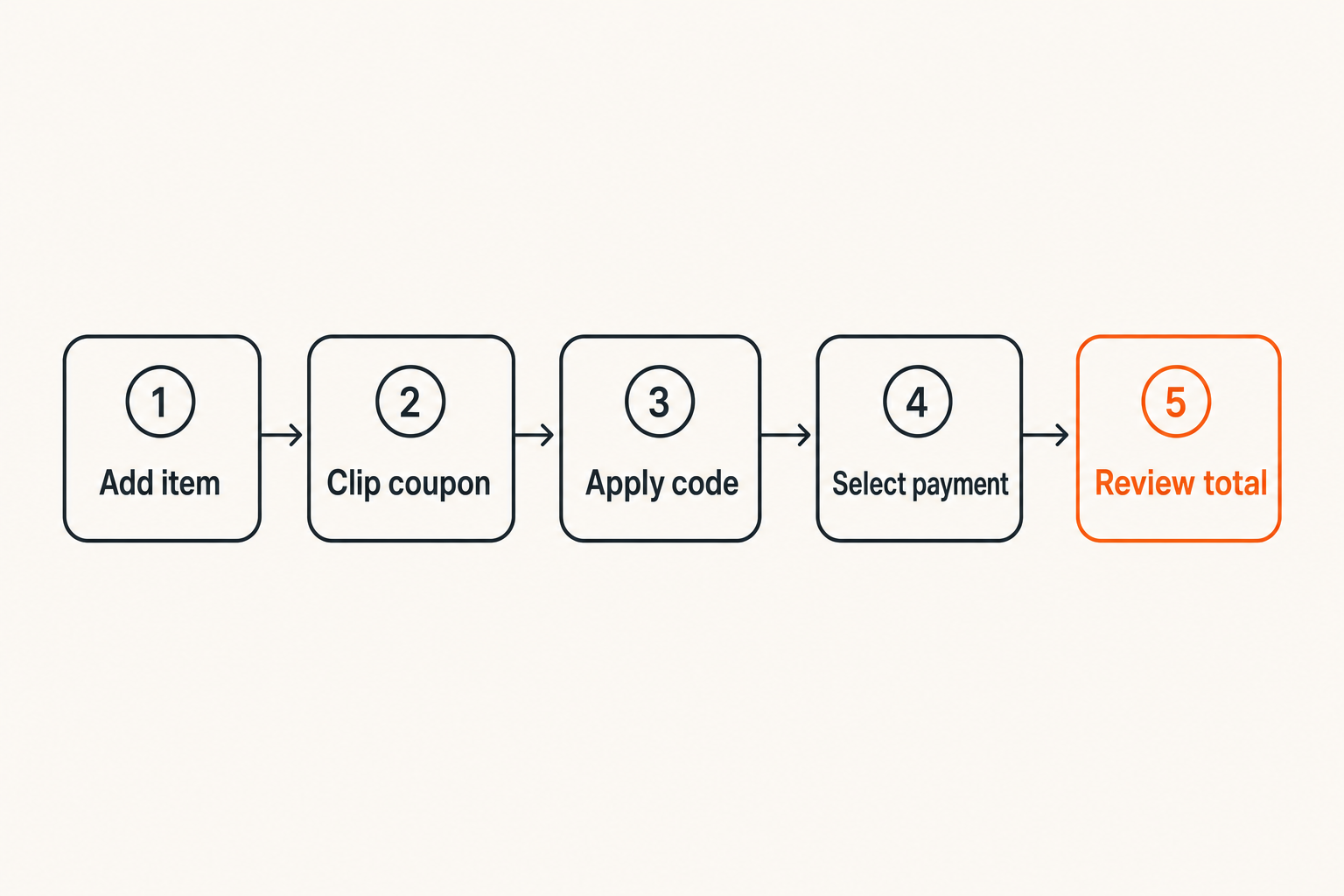
Use a repeatable checkout sequence
Random testing wastes time. A repeatable sequence keeps you from missing obvious discounts or double-counting savings.
Use this workflow:
- Add the exact item variant to cart, including size, color, quantity, seller, and condition.
- Clip any visible Amazon digital coupon on the product page.
- Confirm whether the item price changed in cart.
- Apply the Amazon promo code in the promotional code field if available.
- Select the shipping speed you would actually use.
- Select the payment method required for any payment offer.
- Review the final order total before placing the order.
- Compare that final total against your baseline price.
The baseline matters. It might be the same product without a code, a competing retailer, a previous Amazon purchase price, or a generic replacement product. Without a baseline, a percentage discount is just noise.
Compare final totals, not banners
The final total includes shipping, estimated tax, promotions, gift card balance, and sometimes packaging or delivery choices. That is the number you should compare.
A simple notes template works:
Item:
Seller:
Baseline price:
Coupon clipped: yes/no
Promo code tested:
Payment offer: yes/no
Final total:
Buy / wait / skip:
Reason:
This looks excessive for a cheap item. It is not for recurring purchases, gifts, electronics, household orders, or sale events. Even a lightweight version helps you avoid buying because a banner made the discount look bigger than it was.
Know when to abandon a code
A code is not worth unlimited testing. Set a cutoff.
A reasonable cutoff might be:
- One code for low-cost purchases
- Three codes for medium purchases
- More testing only for expensive items or bulk orders
- No testing if the item is urgent and the discount is tiny
Practical rule: Coupon hunting has a cost. If the expected savings are smaller than the time and attention required, stop testing and make the buy-or-wait decision.
This is where disciplined shoppers outperform frantic shoppers. They do not find every code. They find enough real savings without letting the process take over the purchase.
What works: stacking, timing, and cart strategy
Stack allowed discounts in the right order
Stacking means combining discounts. On Amazon, stacking is limited and inconsistent, but it can happen. A product may have a sale price, a clipped coupon, a Subscribe & Save discount, and a payment offer. A separate promo code may or may not stack.
The safe order is:
- Confirm sale price.
- Clip product coupon.
- Select subscription or quantity option if you truly want it.
- Apply promo code.
- Select payment offer.
- Check final total.
Do not reverse-engineer the rules too hard. Amazon checkout will decide what applies. Your job is to test cleanly and compare totals.
Use wish lists as price watch queues
A wish list is not just a someday list. It is a price watch queue.
For non-urgent purchases, add the item to a list and wait for one of three events:
- Price drops
- Digital coupon appears
- Big sale event begins
This works especially well for gifts, replacement parts, pantry items, kids items, and electronics accessories. You are not trying to predict the perfect bottom. You are creating enough delay to avoid paying the worst price.
Watch shipping thresholds and delivery tradeoffs
Shipping can erase coupon savings. If a promo code requires a minimum spend, you may be tempted to add filler items. That only works if the filler items are things you would have bought anyway.
Delivery speed matters too. If selecting a slower delivery option gives you a credit or allows a better bundle, fine. If delaying a necessary item creates an emergency purchase later, the savings were fake.
The mistake teams make is treating the cart as a coupon machine instead of a purchase plan.
What fails: dead codes, fake urgency, and bad deal math
Expired codes that still circulate
Dead codes are normal. Coupon sites, forums, social posts, and old deal pages keep circulating offers long after they stop working.
Common dead-code signals include:
- No recent successful use
- Vague language like sitewide when Amazon rarely works that way
- No category or seller notes
- Comments saying it worked months ago
- A copied code that appears on many unrelated sites
Do not get angry at every failed code. Just downgrade its trust and move on. The workflow should make failure cheap.
Marketplace confusion
Amazon marketplace complexity creates messy coupon behavior. Two listings can look identical but have different sellers. One color can be discounted while another is not. A product can be sold by a third-party merchant and fulfilled by Amazon, or sold and shipped by Amazon directly.
That matters because the promotion may belong to the seller, not the product category. If you change the seller box, your code test may no longer be valid.
Related reading from our network: operational dashboards have the same failure pattern when status signals come from different systems; this SSE streaming guide for media and torrent dashboards is technical, but the core idea is familiar to shoppers too: disconnected signals create bad decisions.
Discount theater at checkout
Discount theater is when the purchase feels cheaper but is not actually a good deal.
Examples:
- A list price discount makes a normal price look urgent.
- A coupon applies only after you add extra items you do not need.
- A subscription discount creates future orders you forget to cancel.
- A payment offer pushes you to use a card that carries a balance.
- A bundle includes accessories you would not buy separately.
What works is plain comparison. What fails is reacting to urgency language.
A practical workflow for big Amazon sale events
Before the event
Big events like Prime Day, Black Friday, Cyber Monday, and seasonal Amazon sales reward preparation more than panic.
Before the event:
- Build a short list of items you actually need.
- Write down current prices before the sale starts.
- Check whether the product has regular digital coupons.
- Decide your buy price.
- Remove nice-to-have items that are likely impulse buys.
- Confirm return windows for higher-risk categories.
This turns sale day into validation, not browsing.
During the event
During the event, move fast but do not skip verification.
For each item, ask:
- Is the sale price lower than my baseline?
- Is there a clipped coupon?
- Is there an Amazon promo code that applies?
- Does the final total beat alternatives?
- Would I still buy this without the countdown timer?
If the answer to the last question is no, wait. Countdown timers are useful for sellers. They are not always useful for budgets.
After the event
After the event, review what happened. This is the part most shoppers skip, but it improves future savings.
Capture:
- Items bought
- Final price
- Codes or coupons used
- Items skipped
- Any returns
- Any subscriptions created
A small post-sale review prevents repeat mistakes. If you bought items you did not need, the issue was not code discovery. It was purchase control.
Compare code-hunting approaches
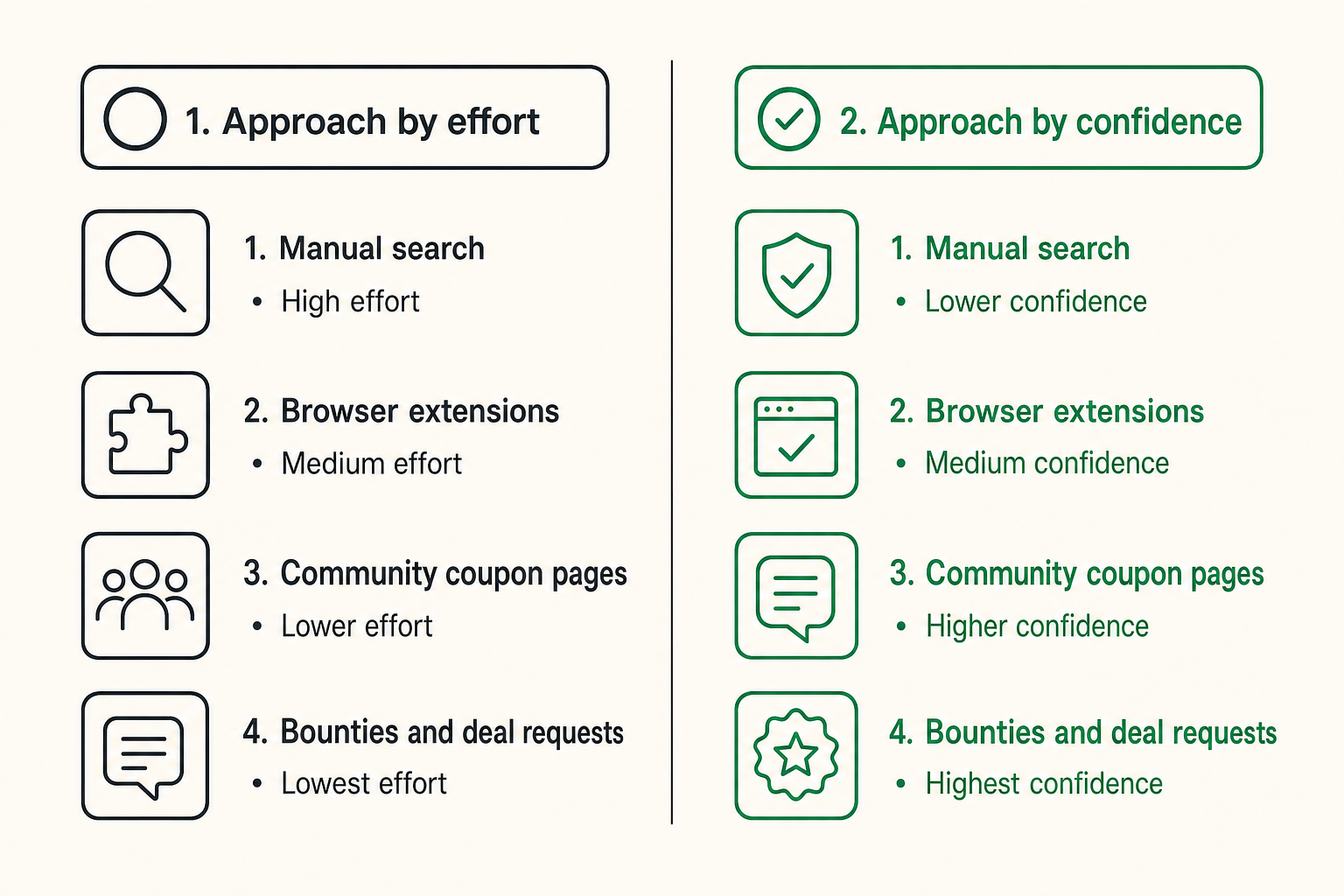
Manual search
Manual search gives you control. You can check Amazon, search engines, forums, and coupon sites. It also creates tab sprawl and repeated testing.
Manual search works when the item is expensive enough to justify a few minutes. It fails when you use it for every small purchase.
Browser extensions
Browser extensions can reduce manual work by testing codes automatically or surfacing cashback-style offers. The tradeoff is trust and visibility. You may not always know which codes were tested, what data is collected, or whether the extension favors certain partners.
That does not mean extensions are bad. It means they should be one input, not the whole workflow.
Community coupon pages
Community coupon pages work best when they include recent shopper feedback. A code with context is more useful than a code with a giant headline.
A good community note might say: worked on select home items, failed on electronics, requires seller coupon page, tested today. That kind of note saves time because it tells you where not to test.
Bounties and deal requests
Sometimes you are looking for a code for a specific store or product and do not want to spend time hunting. In that case, community requests can help. If you find a working Amazon promo code or useful deal context, you can also submit a coupon to c0upons so other shoppers do not repeat the same search.
| Approach | Best for | What works | What fails |
|---|---|---|---|
| Manual search | Expensive or unusual purchases | High control, careful comparison | Too slow for everyday items |
| Browser extensions | Quick checkout testing | Fast code attempts | Limited transparency |
| Community pages | Recent shopper knowledge | Context and freshness | Old codes without notes |
| Deal requests | Specific hard-to-find savings | Shared effort | Not instant enough for urgent buys |
The practical answer is usually a mix. Use Amazon-native discounts first, community context second, automation third, and your final total as the decision point.
Operational checklist for budget-conscious households
Build a purchase rule
Households need rules because Amazon makes buying too easy. A purchase rule is a lightweight filter, not a punishment system.
Example rules:
- Under $20: buy if needed and no obvious coupon appears.
- $20 to $100: check coupon, price history from your own memory or notes, and alternatives.
- Over $100: wait 24 hours unless urgent.
- Subscription: review future delivery date before checkout.
- Sale event: buy only from the prewritten list.
Practical rule: The higher the purchase price or repeat frequency, the more structured your coupon workflow should be.
Track recurring categories
The best savings often come from boring categories: cleaning supplies, pet food, pantry goods, batteries, school supplies, toiletries, and replacement parts.
These categories are good candidates for a simple recurring tracker:
Category | Usual item | Good price | Last bought | Coupon notes
Pet food | Brand and size | Target price | Date | S&S sometimes beats code
Cleaning | Refills | Target price | Date | Coupons appear monthly
Batteries | Pack size | Target price | Date | Wait for multi-pack deal
You do not need a complex spreadsheet. You need enough memory support to know whether a discount is actually good.
Decide who approves impulse buys
If more than one person shops from the same household account, agree on rules. Amazon promo code savings can become an excuse for impulse buying.
For shared budgets, decide:
- Which categories are auto-approved
- Which purchases need a second look
- How to handle gift purchases
- Whether subscriptions need monthly review
- What counts as a real deal
This is not about being strict for its own sake. It is about preventing the classic failure mode: saving 10% on something nobody needed.
Make Amazon promo code savings repeatable with c0upons.com
Where c0upons.com fits
c0upons.com is built for shoppers who want practical ways to save money with coupon codes, promo codes, sales, and deal roundups. The useful role is not replacing your judgment. It is helping you reduce search time and add community context before checkout.
For Amazon, that means using community-submitted codes and notes as one part of the workflow:
- Check Amazon-native discounts.
- Check recent community code activity.
- Test only codes that plausibly match the item, seller, or category.
- Compare final totals.
- Share useful results back when you can.
That is the loop. Find, test, decide, contribute.
Contribute back to the coupon loop
Coupon communities work when shoppers share what happened, not just what looked promising. A failed code with a clear note can be as useful as a working code because it prevents wasted time.
Good notes include:
- Date tested
- Category or product type
- Whether it required Prime
- Whether it worked with Subscribe & Save
- Whether it failed at checkout
- Any minimum spend or seller restriction
This is how a coupon page becomes operational instead of decorative. The goal is not more codes. The goal is better checkout decisions.
Try c0upons.com
Use c0upons.com to find and share practical Amazon promo code savings, coupon codes, sales, and deal roundups without turning checkout into a guessing game: Try c0upons.com.